


Digital Compass for Android
2.81.09K Reviews
App Specs
- Version
- 48.69
- Updated On
- License
- Free
- Downloads
- 1,000,000+
- Developer
- Sugar Tool
- Categories
- Travel & Local
- Platform
- Android
Screenshots
 Analysis by AppCompare
My first week with a compass app is usually the easiest part: I open it, point my phone, and enjoy having a direction readout close at hand. The more useful test comes later, when the novelty has worn off and I have to decide whether it solves a recurring problem. Digital Compass for Android is appealing when I want a quick sense of direction without opening a full navigation app, but its lasting value depends on whether I actually spend time outdoors or in unfamiliar places.
A handy first impression, with sensible expectations
The basic idea is straightforward: use the phone as a compass, with map and location-related tools alongside it. That makes the app easy to understand on first opening. I don’t have to learn a complicated route-planning workflow just to check which way I’m facing. For a short walk, a campsite, or a confusing stretch of city streets, that low-friction start is its strongest early appeal.
It’s worth keeping the role of a phone compass in perspective, though. A compass gives orientation; it does not automatically tell me which route is safest or fastest. I treat the direction display as one clue, then use a map or local signs to decide where to go. That distinction matters most on trails, where a bearing can be useful but is not a substitute for knowing the route.
Where it earns a place in a routine
After the first few uses, the app makes most sense as a small utility I reach for in specific situations rather than a replacement for every navigation tool. If I’m leaving a station in an unfamiliar neighborhood, a quick check of north can help me orient the map before I start walking. At a trail junction, it can help me compare the direction I’m facing with the route I intended to follow. Neither task requires me to plan a full journey inside the app.
That focused role is also its main trade-off. A dedicated map or navigation service is usually a better choice when I need turn-by-turn directions, a saved route, or a clear overview of a longer trip. A physical compass is preferable when I’m planning to navigate away from phone coverage or need an instrument that does not depend on a charged phone. I see this app as a convenient extra for everyday orientation, not as a single solution for every kind of travel.
Getting Started with Digital Compass
First things first, downloading the Digital Compass is a breeze. Just hop onto the Google Play Store, type it in, and boom – it’s ready to guide you. The installation was quick, and it doesn’t take up much space, which is always a win in my book.
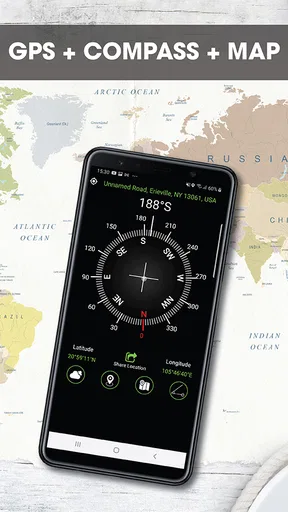
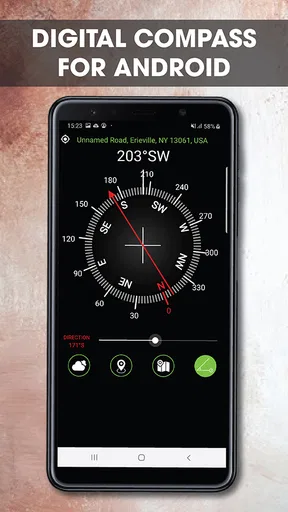
Once you open the app, you’re greeted with a simple yet sleek interface. It’s got that user-friendly vibe that doesn’t make you scratch your head trying to figure out what’s what. Let’s just say if you can use a regular compass, you can definitely navigate this app with ease.
Worth Reading Before You Choose

EA SPORTS FC Mobile 26 Is a Bigger Football Game, but It Takes Time

Flipboard Shows What News Apps Must Do Beyond the Feed

Switching to Android Auto Means Rethinking Your Driving Routine

Google Calendar Makes a Crowded Week Easier to Manage

Ludo King Makes the Most of the Minutes Between Plans

Baby Panda World Brings Quick Play to Modern Phones, but Its Game Library Feels Busy
Features That Stand Out
Now, onto the juicy details! One of the first things I noticed is how accurate the compass is. I tested it out on a mini hike and it didn’t steer me wrong. It’s like having your own personal guide right there in your pocket.
Another cool feature is the GPS speedometer. I mean, how often do you get to see how fast you’re walking or driving in real-time? It’s such a neat addition for those of us who love tracking our pace. Plus, it even shows the altitude, which, as someone who loves mountain trails, is a pretty sweet deal.
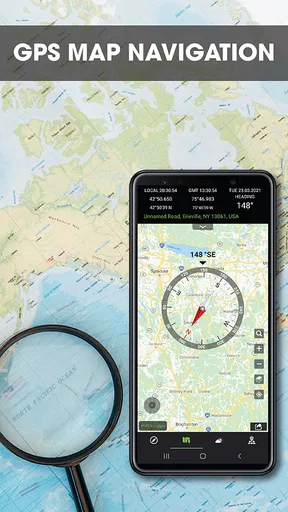
The app also supports a variety of map types. You can switch between normal, satellite, terrain, and hybrid views, depending on what you need. It’s not just a compass; it’s like your own mini navigation system.
Making the tools useful outdoors
The combination of direction, map views, speed, and altitude is most useful when I give each item a job instead of treating the screen as a pile of numbers. Before a walk, I can use the map to understand the area, then check the compass as I set off. On a hillside, terrain view may make the shape of the landscape easier to read than a standard map, while satellite imagery can help me recognize visible features. Those views support orientation, but I still avoid assuming that a map image shows whether a path is open, public, or safe.
The speed and altitude readouts are best treated as context rather than precise records. They can satisfy curiosity during a walk or help me notice that a route is steadily climbing, but I wouldn’t use a quick glance as a substitute for a dedicated trip log or a carefully planned fitness routine. A practical habit is to check them only when stopped somewhere safe, rather than looking down while walking or driving. The app may show a speedometer, but safe attention belongs on the road.
Usability and Performance
Let’s talk usability. The Digital Compass runs smoothly without any hiccups. I didn’t experience any lag, which is crucial when you’re relying on it to find your way. Battery consumption is pretty low too, so you don’t have to worry about it draining your phone during a long day out.
One thing I appreciate is the calibration feature. You know how sometimes compasses need a little fine-tuning? This app makes it super easy to calibrate with just a few swipes and rotations, ensuring you’re always on the right track.
Calibration, surroundings, and sensible checks
For a more dependable reading, I make calibration part of the first check rather than waiting until the compass seems obviously wrong. I hold the phone away from nearby metal objects and other possible sources of interference, then follow the app’s calibration motion if the reading looks inconsistent. I also turn slowly and compare the direction with something I can identify, such as a map or the layout of a street. A compass that behaves oddly near a car, railings, or indoor equipment may be reacting to its surroundings, not revealing a problem with the route.
This is one reason I wouldn’t judge accuracy from a single glance. A quick direction check is convenient, but the phone’s position and nearby objects can affect the result. If a bearing matters for a longer walk, I recheck it in a clearer spot and confirm it against the map. That small pause is more useful than blindly trusting a number because it looks precise.
What changes after the novelty fades
Whether the app deserves lasting space on my phone comes down to habit. If I regularly walk new routes, travel through unfamiliar neighborhoods, or enjoy checking orientation during outdoor trips, the compass and map views can keep earning occasional use. If I mostly follow familiar roads and already rely on another map app, I may open it once, enjoy the novelty, and then forget it is installed. That isn’t a flaw so much as a sign that the tool suits a particular routine.
For a realistic everyday example, imagine arriving at a large park from an entrance you have never used. I can look at the map, establish which way I’m facing, and choose a path without immediately plotting a complete route. If I later reach a junction, I can check my bearing again and use the terrain or satellite view to make sense of the surroundings. If I need a route back with reliable turn-by-turn guidance, I would switch to a navigation app instead of expecting a compass to do that job.
The app is made by Sugar Tool and sits in the travel and local category. It is free to install, with optional in-app purchases listed from $4.99 to $29.99 per item, so I would look carefully at any purchase prompt and decide whether the extra value fits my use before paying. Its Everyone age rating makes it broadly suitable, while its 2.8 average from around 5,500 ratings suggests that people’s experiences are mixed. With over 1 million installs, it has reached a sizeable audience, but popularity alone does not tell me whether it will match my particular phone or habits.
Maintenance and sources of fatigue
The ongoing effort is modest, but not zero. I need to remember that phone-based orientation can be affected by the environment, keep enough battery for the rest of the day, and check that the direction makes sense before acting on it. Those are normal trade-offs for using a phone as a navigation aid. For a short city walk, they are easy to manage; for a remote outing where the phone is also my only emergency device, relying on it as my sole compass would be a poor plan.
Another possible source of fatigue is having overlapping tools. If my regular map app already gives me the orientation and location context I need, opening a second app may feel like extra work. Conversely, if I only need a simple bearing, a full navigation app can feel unnecessarily busy. I’d keep this one when its direct compass view solves a need quickly; I’d skip it if I never reach for that view or if I need dependable offline route guidance more than a compass.
Why You Might Love It
So, why should you consider downloading this app? If you’re into outdoor activities, travel, or just want a reliable direction tool, this app has you covered. It’s simple, accurate, and packed with handy features that make navigation a breeze.
Even if you’re not a hardcore adventurer, having a digital compass at your fingertips can be incredibly useful in everyday situations – like finding your way in a new city or just heading out on a spontaneous road trip.
Who should choose it—and who should pass
I’d recommend giving it a try if you want a direct way to check direction, like having map perspectives close by, and expect to use those tools now and then. It may suit casual hikers who already know their route, travelers trying to orient themselves after stepping out of a station, or curious walkers who enjoy seeing speed and altitude as they go. The key is treating those features as helpful context, not as a promise of complete navigation.
I’d steer someone toward a dedicated navigation app if they need route planning, turn guidance, or a familiar system they already use for daily driving. Someone heading into a remote area should plan for phone battery and coverage limitations and carry appropriate navigation equipment rather than trusting any single phone app. And if I only need directions once in a while, the map app already on my phone may be enough. The best choice depends less on the number of features and more on what I actually do outside.
Final Thoughts
In conclusion, the Digital Compass for Android is a solid choice for anyone in need of a dependable navigation tool. It’s got everything you need wrapped up in a neat, user-friendly package. Whether you’re hiking up a mountain or just exploring the urban jungle, this app is ready to guide you every step of the way.
So, go ahead, give it a try, and let me know what you think! Happy exploring!
My long-term verdict
My lasting impression is that this is most valuable as a lightweight orientation aid, not an app I would expect to open every day. Its compass, map options, speed, and altitude can make a walk or unfamiliar visit more engaging, especially when I use them deliberately and verify readings that matter. The current version is 48.69, and it supports Android 6.0 and newer, which gives many Android users a straightforward starting point for checking compatibility.
For me, the decision is simple: keep it if a quick bearing and alternate map views fill a gap in the way I travel; skip it if another app already handles that job or if I need robust route guidance. It costs nothing to install, but its mixed average rating is a reason to test it in low-stakes situations before depending on it outdoors. That modest approach lets the app prove its recurring value through actual use, rather than through the appeal of a new icon on the home screen.
Pros
- Accurate and responsive compass readings.
- User-friendly interface and easy navigation.
- Works offline without internet connection.
- Minimal battery consumption during use.
- Customizable themes and display options.
Cons
- Contains ads that can be distracting.
- Limited features in the free version.
- Occasional calibration issues reported.
- Requires access to device location.
- No built-in tutorial for beginners.
FAQs for Digital Compass for Android
How accurate is the Digital Compass on Android devices?
The accuracy of the Digital Compass largely depends on the quality of your device's sensors. Most modern Android smartphones have precise sensors that ensure reliable readings. However, external factors like magnetic interference from nearby electronics or metal objects can affect accuracy. Regular calibration can help maintain optimal performance.
Does the Digital Compass require an internet connection to work?
No, the Digital Compass app does not require an internet connection to function. It relies on the device's built-in magnetometer sensor to determine direction. However, some additional features, such as map integration or location-based services, might need internet access for full functionality.
How do I calibrate the Digital Compass on my Android device?
Calibration is often necessary to ensure the compass functions accurately. To calibrate, you typically need to move your device in a figure-eight motion. Some apps may provide on-screen instructions or prompts to guide you through the process. It's best to perform calibration away from metal objects or electronic devices that could cause interference.
Can the Digital Compass be used indoors?
Yes, the Digital Compass can be used indoors. However, its accuracy might be compromised by interference from metal structures or electronic devices. For the most reliable readings, it's recommended to use the app in open spaces or areas with minimal interference.
What features does the Digital Compass offer besides direction finding?
Besides basic direction finding, many Digital Compass apps include additional features such as GPS integration, altitude measurement, and location sharing. Some apps offer map overlays or track your movements for hiking or travel purposes. Be sure to review the app's description to understand all available features.


